Build Your Brand Profile First — So AI Content Doesn't Get Your Facts Wrong
TL;DR
BrandKit is an editable source of brand facts for your own content workflow, not a guarantee of what external AI systems will say. This guide shows how to open the BrandGEO content hub, review extracted information, correct mistakes, export the profile, and check those facts before generating an article.
Why AI Gets Your Brand Wrong
Have you ever asked ChatGPT about your own brand? If you don't run a major corporation, the answer might surprise you.
AI might state your company was founded in the wrong year, confuse your product's features with a competitor's, or invent a CEO who never worked at your company. This isn't malice — it's default behavior when information is insufficient: AI fills gaps with plausible-sounding but unverified content.[1]
Citation errors matter, but a test of news attribution is not a general brand-fact error rate. Columbia University's Tow Center tested eight AI search tools across 1,600 news queries. More than 60% of responses were incorrect overall; Perplexity erred on 37% of those queries and Grok 3 on 94%.[2] This sample measured news retrieval and attribution, not answers about small businesses.
This is especially dangerous for small businesses. Large brands like Apple or Nike have massive amounts of structured information across the internet — Wikipedia pages, news coverage, Google Knowledge Graph entries — giving AI plenty of facts to draw from. But if you're a local coffee roaster, an independent design studio, or an emerging DTC brand, the structured information about you online may be practically nonexistent. AI can't find facts, so it creates them.
Incorrect brand information can mislead a customer, but one AI answer cannot establish lost revenue. Check the facts you control on your own site, compare them with public profiles and observed AI answers, and correct a specific mismatch before claiming an outcome.
What a Brand Profile Actually Is
A brand profile is a structured fact sheet about your brand. Not marketing copy, not your brand story — a set of verifiable data points:
- Full brand name and common abbreviations
- One-line positioning statement (who you are, what you do, how you're different)
- Target audience (who your customers are)
- Core products/services and their key features
- Competitor list (who your customers choose between)
- Founding date and founder information
- Location and service area
- Brand voice and language preferences (formal vs. casual, preferred vs. avoided terminology)
You probably know all of this — of course, it's in your head. But AI isn't in your head. AI sees your website, your structured data, and public mentions across the internet. If the brand information in those places is inconsistent, incomplete, or nonexistent, AI improvises — guessing who you are every time it generates content.
A BrandKit profile puts those facts in your own content workflow. It does not automatically become public knowledge for external AI systems; verified facts still need to be published on accessible pages.
Why does this matter for your brand entity? If your site, public profiles, and structured data disagree about product names, location, or pricing, readers and search systems cannot easily verify the same organization.[4][5] Consistent, checkable facts are more useful than an unverified claim about the relative weight of brand mentions and links.
Building a brand profile is essentially constructing your brand entity — telling AI "I'm a real, clearly defined thing" rather than leaving it as a vague concept that needs gap-filling.
Check How AI Currently Describes You
Before building your profile, see what AI currently says about your brand — it may be eye-opening.
The simplest method: open ChatGPT and type "[your brand name] — what company is this? What do they do?" Then try variations: "[brand] vs [competitor] — how do they compare?" "[brand] — who founded it?" "[brand] — what are their prices?"
Compare AI's answers to what you know to be true. You'll likely find a mix: some information is correct but outdated, some is fabricated, and some key details are simply missing (AI responds with "I don't have enough information to answer that").
If you've already run a BrandGEO audit, the Brand Entity gate in your audit report systematically evaluates how well AI understands your brand. It checks whether your website provides sufficient structured brand information — Organization schema, brand descriptions, founder details — for AI to accurately identify who you are.
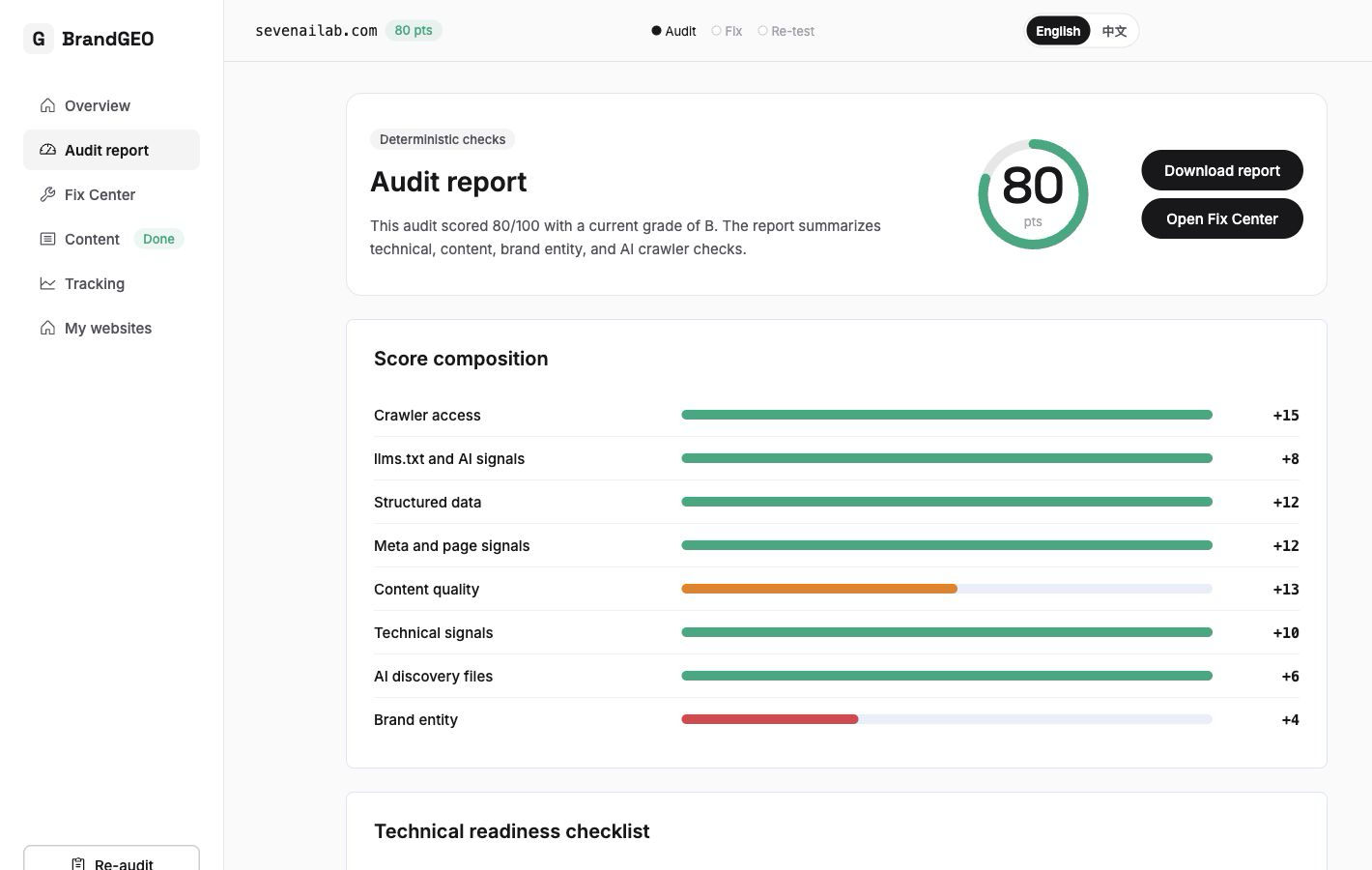 The Brand Entity gate: checks whether your website provides enough structured brand information for AI to accurately understand who you are.
If the Brand Entity gate shows multiple missing or failing items, AI lacks structured data about your brand — exactly the problem a brand profile solves.
Step by Step: Building Your Brand Profile with BrandKit
BrandGEO's BrandKit lives in the Content Hub (/site/your-domain/content). Its purpose: let you organize core brand facts into a structured format in the shortest time possible, then use that as the foundation for all content generation.
Step 1: Open the Content Hub and Check BrandKit Status
Navigate to /site/your-domain/content. At the top you'll see the BrandKit summary card with a status badge:
- Not started: you haven't generated a brand profile yet.
- Generating: the system is auto-extracting brand information from your website.
- Ready: your brand profile is built and available for editing and use.
- Failed: generation hit an error; retry needed.
If the status is "Not started," click the "Generate" button. The system crawls your website, extracts identifiable brand information, and produces an initial brand profile.
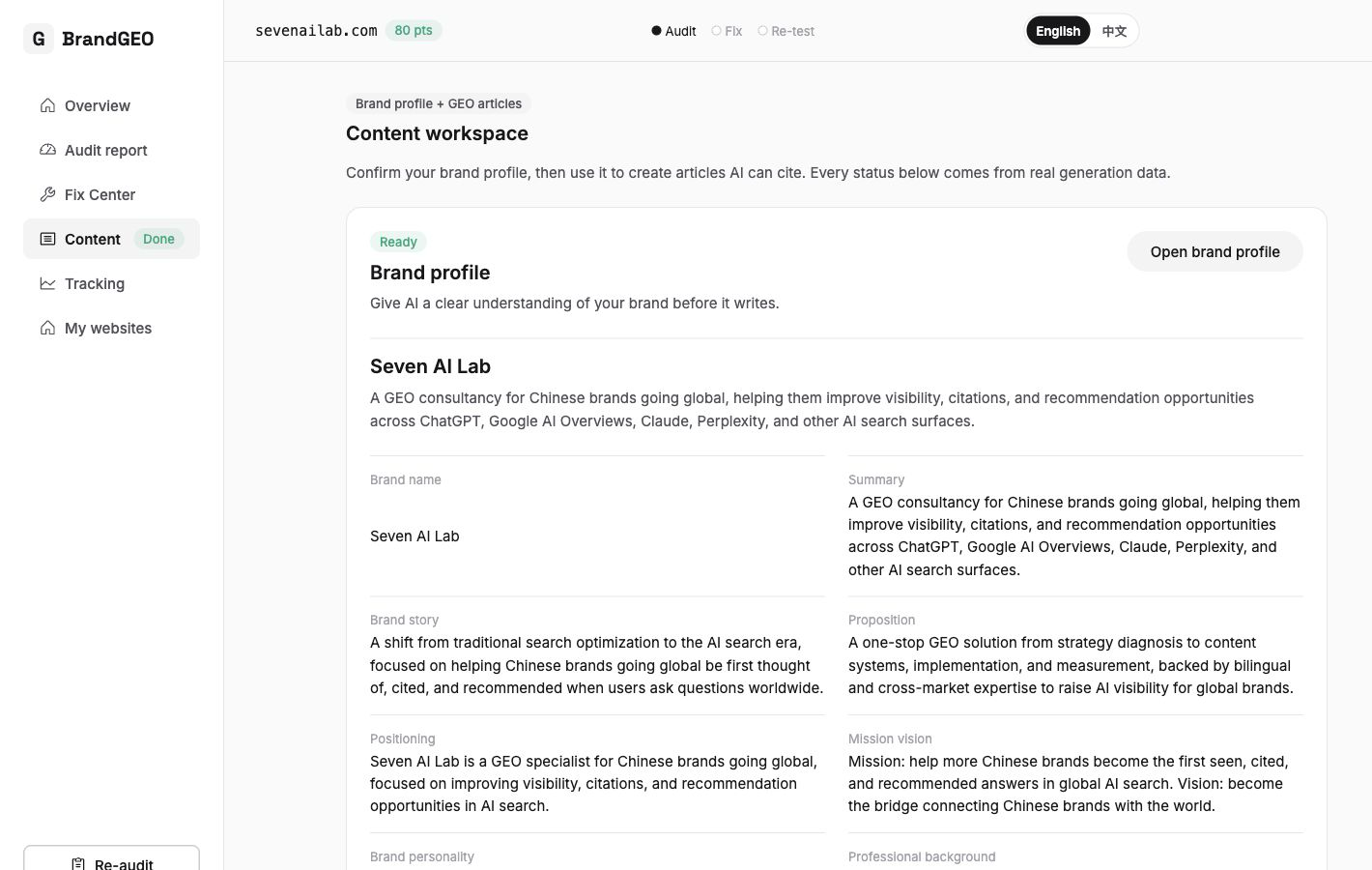 The BrandKit summary card: the status badge shows your profile's current state, and the field grid previews core brand info. Note that the "New Article" button is disabled when BrandKit isn't ready — the system requires a brand profile before generating content.
An important design detail: the "New Article" button is disabled when BrandKit isn't ready. This is intentional — the product considers content generated without a brand profile to lack reliability guarantees. Profile first, content second.
Step 2: Open the Editor and Review Each Section
Once BrandKit is generated, click "Edit" to enter the BrandKit Editor (/brand-kit/[runId]/edit).
The editor is organized by sections. Each section covers one dimension of your brand: positioning, target audience, product descriptions, competitive landscape, brand voice, and more. Auto-extracted information is pre-filled in the corresponding fields, but you need to review each one:
- System got it right: confirm and move on.
- System got it wrong: edit with the correct facts.
- System missed it: add manually. These are typically details the system can't auto-extract from your website — like your brand's founding story, your core differentiator, or your preferences for brand tone.
A guiding principle: fill in more rather than leaving blanks. When AI generates content, every BrandKit field serves as reference material. The more complete the profile, the more accurate and consistent the output.
Step 3: Save and Export
After editing, save. You can also use the "Export Markdown" button to download the entire brand profile as a Markdown file. This export is useful for sharing brand facts with your team as a baseline document, pasting into other AI tools (ChatGPT, Claude) as prompt context to keep their output consistent, and as a source for your llms.txt file (see how to add llms.txt).
Step 4: Generate Your First Article Using the Profile
With BrandKit ready, the Content Hub's "New Article" button becomes active. Click it to enter the Content Workbench, where you'll see 6 content templates: Smart Suggestions, Blog Post, Listicle, Ultimate Guide, How-To, and Comparison Post.
Pick a template → click "Generate Titles" → the system offers candidate titles → pick one → click "Create Article."
The generated article automatically references your BrandKit information — brand name, positioning, audience, product features — without you re-entering these details each time. That's the value of a "single source of truth": write once, use everywhere.
For a detailed guide on writing content AI will actually cite, see how to write content AI will cite.
What Changes After You Build Your Profile
Once the brand profile is in place and actively used, changes show up at two levels.
Content level: all articles generated through the Content Workbench stay consistent with your brand facts — name, positioning, audience, competitive framing won't vary from article to article. If you've used ChatGPT to write content before, you know the pain of re-explaining "who I am and what I do" every session. With a brand profile, that step is automated.
Public-information level: BrandKit is internal to your content workflow. After reviewing the facts, publish accurate names, products, and contact details on accessible website pages; Organization markup should match the visible content.[6] Whether an external AI system cites those pages must be observed separately.
You can verify this through BrandGEO's tracking features — check whether AI's brand descriptions are becoming more accurate and whether key facts are correct. If the Brand Entity gate previously showed failures, re-auditing should show improvement.
Your Brand Profile Isn't a One-Time Task
Like content freshness (see why AI doesn't cite old content), your brand profile needs maintenance.
When to update it: product line changes (new or discontinued offerings), positioning shifts, competitive landscape changes (new competitors entering, old ones leaving), team changes, and major website updates. If you've redesigned your site or added significant new pages, the BrandKit page will prompt "Found N new pages — regenerate?" — click to let the system incorporate new content.
A reasonable rhythm: check whether BrandKit is current each time you run an audit. If you follow the 90-day GEO workflow, brand profile updates fit naturally into the process.
FAQ
My brand is very small and has almost no information online. Is building a profile worthwhile?
The smaller you are, the more it helps. Large brands have enough public information that AI can piece together a roughly accurate description even without a structured profile. Small brands face exactly the opposite problem — not enough information, so AI guesses. Building a profile proactively gives AI accurate facts instead of forcing it to improvise. It also keeps your output consistent any time you use AI tools to write content.
What if BrandKit's auto-generated information is wrong?
Edit it directly in the editor. The auto-extraction is based on your website's current content — if your site's brand description is itself incomplete or outdated, the extraction won't be perfect. That's exactly what the editing step is for: you correct AI's understanding so the final profile is accurate.
How does the brand profile relate to Organization schema (JSON-LD)?
The brand profile is the "internal version" of your brand facts — for your own use and content generation workflow. Organization schema is the "external version" — embedded in your website code and directly readable by search engines and AI crawlers. The two should stay aligned. If you update your positioning in BrandKit, your website schema should also update. See the schema and robots.txt guide for implementation details.
I already have a brand book. Do I need to rebuild everything in BrandGEO?
Brand books typically contain visual standards, tone guidelines, mission and vision — useful for human team collaboration, but AI can't parse a PDF brand book to extract structured facts. BrandKit's value is converting your brand book's core facts into a structured, AI-usable format. If you already have a brand book, building BrandKit is fast — just transfer the key information into the structured fields.
Sources
- GEO Toolbox, "AI Hallucinations: Why AI Gets Your Brand Wrong", 2026. Analysis of AI gap-filling behavior with insufficient brand data.
- Columbia Journalism Review / Tow Center, AI Search Has a Citation Problem, 2025. Eight tools, 1,600 news queries, more than 60% incorrect overall, 37% for Perplexity and 94% for Grok 3; not a brand-fact error rate.
- Hexagon, Protecting Your E-Commerce Brand in Generative AI, background on reviewing public brand information, not a general invisibility estimate.
- Google Search Central, Organization structured data, public brand facts and markup should agree.
- Schema.org, Organization, organization entity properties.
- Google Search Central, Introduction to structured data, markup should describe visible page content.
- Averi AI, "The Entity Strategy Nobody's Talking About", 2026.
- Discovered Labs, "Entity Recognition & Knowledge Graphs", 2026.
Last updated: July 2026
Are your public brand facts consistent? Run a free BrandGEO audit, check the Brand Entity gate, and use BrandKit to organize facts for your own content workflow. Inspect external AI answers separately. For the full process, see the 90-day guide.