Add a Set of FAQs That AI Loves to Cite
TL;DR
A useful FAQ pairs a real customer question with a direct, self-contained answer. It does not guarantee an AI citation. This guide shows how to choose questions, edit titles and answers, review BrandGEO's FAQ draft in the Fix Center, publish visible content, and check the deployed page before measuring outcomes.
What AI Search Engines Are Actually Looking For
Here's a fact that's not intuitively obvious but very clear in the data: AI search engines aren't "reading articles" — they're "finding answers."
When a user asks ChatGPT "how does a small business do GEO," ChatGPT doesn't read your entire 3,000-word article before making a recommendation. It scans your page looking for the paragraph that most closely matches the user's question format — a heading that asks a similar question, followed by a paragraph that directly provides the answer — then extracts that paragraph as a citation source.
This is why titles and FAQs have a disproportionate impact on AI citation rates.
On titles: AI uses the H1 to determine "what topic is this page about." If your H1 is vague ("Some Thoughts About Our Work"), AI can't match it to a specific user question. H2 subheadings matter equally — AI scans each H2 to locate answers. Writing H2s in question format ("What Is a Brand Profile?") makes them far easier for AI to match than statement format ("Brand Profile Overview"), because users typically phrase their AI queries as questions too.[2]
On FAQs: An analysis of 3,200 AI-cited content passages found that the median cited passage was 28 words long, with 70% of verbatim citations falling in the 15–45 word range.[3] Each FAQ question-answer pair naturally hits this length — one question, a 2–3 sentence direct answer. This isn't coincidence; it's structural matching. The "answer capsule" that AI looks for is nearly identical in format to an FAQ entry.
These observations do not establish a fixed AI-citation lift from adding FAQs. Samples, platforms, and measurement methods differ. For your own site, check that the questions are useful and visible, then record comparable answers before and after publication.
Since 2023, Google has largely limited FAQ rich results to authoritative government and health sites.[7] Write answers for real readers first. If you use FAQPage markup, keep it consistent with visible Q&A; it cannot guarantee citations from ChatGPT or any other AI platform.
The right approach: write great FAQ content first, then add schema markup to make it more discoverable — don't expect schema alone to drive citations.
Self-Check: How Many of Your Current Titles and FAQs Can AI Cite?
Before writing new FAQs, assess what you already have.
Title Diagnosis
Open your homepage and 3–5 most important pages. For each page's H1 title:
- Does it contain keywords your target customers actually search for or ask AI about?
- Is it specific enough for AI to match it to a clear topic? "Our Services" won't work; "Custom Wedding Floral Design in New York" will.
- Is the title within 50–60 characters? That's the length search engines and AI models process most efficiently.
Now check your H2 subheadings: how many use question format? If all your H2s read "Product Features," "Our Advantages," "Process Overview" — statement format — AI will struggle to match them to user questions during scanning.
FAQ Diagnosis
Does your website have an FAQ page or section? If so, check each Q&A pair:
- Does the first sentence of the answer directly address the question? Or does it start with "Thank you for this great question..."?
- Is the answer self-contained? If you cut this Q&A pair out of the page, would the answer still make sense without any other context?
- Is the answer 40–60 words long? Too short and there's not enough information; too long and AI can't extract it cleanly.
- Does the answer contain data, facts, or verifiable information? AI is less likely to cite purely opinion-based answers.
If your website doesn't have any FAQ at all — the good news is that FAQs are the easiest content type to add, with an extremely high return on investment.
If you've already run a BrandGEO audit, the Fix Center will tell you whether you need to add FAQs. Tasks marked as Content type in the task list directly identify which of your pages need FAQ content and provide an FAQ draft editor to help you generate them quickly.
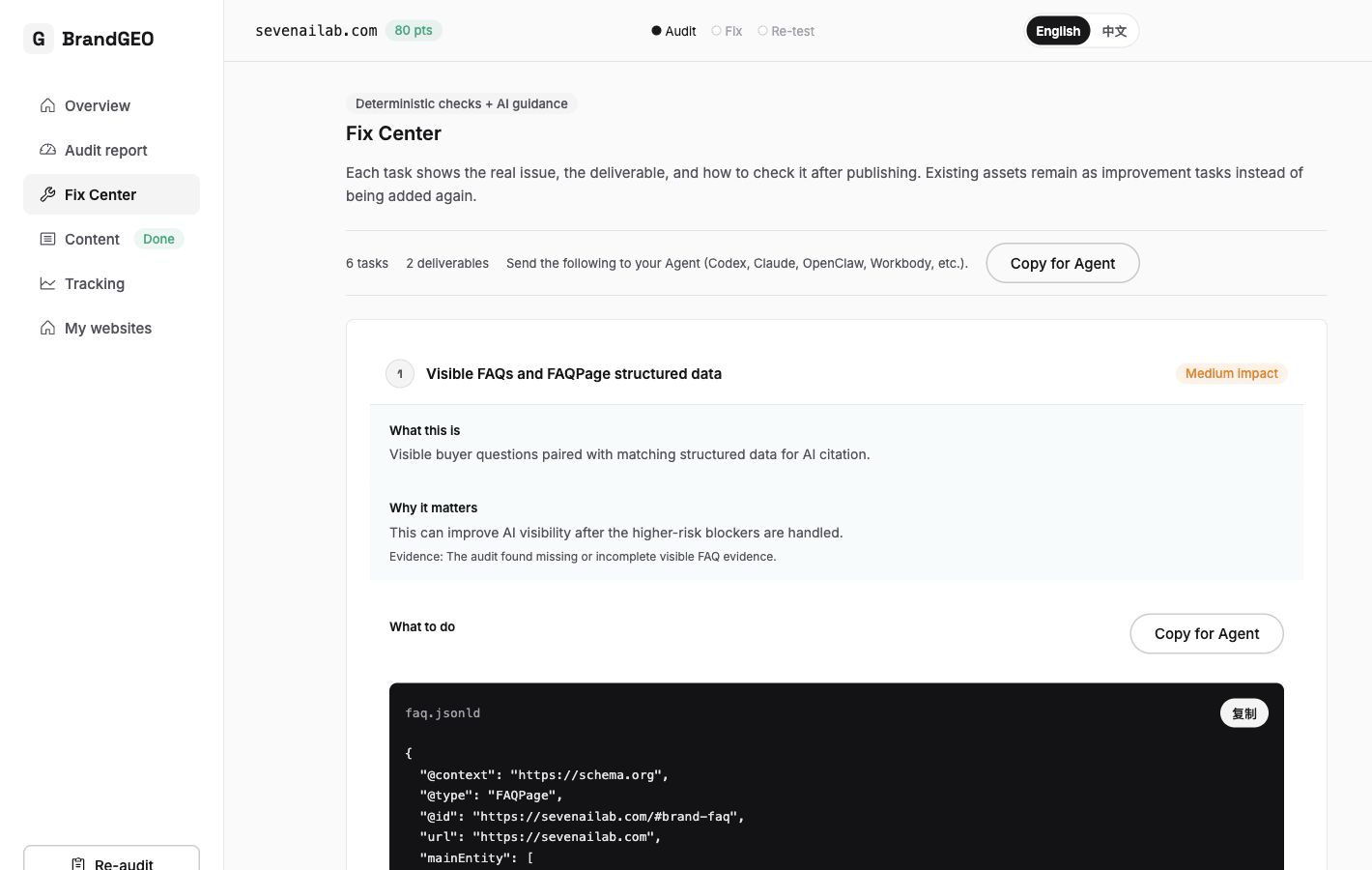 Fix Center task list: Content-type tasks identify the content elements your pages are missing. Priority badges help you decide which to tackle first.
How to Write Titles AI Will Cite
Title optimization is one of the fastest GEO actions to show results. You don't need to change page content — just reformatting titles into AI-friendly formats can make a difference.
Rule 1: Use the User's Question as Your Title
Your H1 title should closely match the phrasing users actually use when asking AI. Don't guess how users phrase questions — actually test a few related queries in ChatGPT and Perplexity to see real question patterns.
Example comparisons:
| Before | After | Why |
|---|---|---|
| Brand Strategy Guide | How Does a Small Business Build a Brand Strategy | Matches user question format |
| SEO vs GEO | What's the Difference Between SEO and GEO | Question format is easier for AI to match |
| Our Services | What Wedding Floral Services Does [Brand] Offer | Includes specific entity and question format |
Rule 2: Write H2 Subheadings in Question Format
Each H2 subheading functions as a "sub-question AI can independently answer." When AI scans your page, question-format H2s directly match user queries — meaning AI can precisely locate the paragraph on your page that answers that question.
The change is simple: convert existing H2s from statements to questions. "Product Features" → "What Are the Core Features?" "How to Use" → "How Do I Get Started?" "Pricing Plans" → "How Much Does It Cost and What Plans Are Available?"
Rule 3: Follow Every Title with an Answer Capsule
This step connects directly to the CEBA writing checklist from the previous article. The first paragraph after every question-format H2 heading should be a 40–60 word direct answer — no background, no preamble, no "this is a complex topic."
A self-contained paragraph matters more than an unsupported universal length target. A reader should be able to understand its conclusion, evidence, and scope without the surrounding article.[1]
The answer capsule formula: [Core conclusion] + [One supporting data point or fact] + [Scope/qualifier].
Example:
Does a small business need GEO?
Yes. GEO (Generative Engine Optimization) is how you get your brand recommended and cited in AI search engines like ChatGPT and Perplexity. Gartner projected a 25% decline in traditional search volume by 2026, and users increasingly get information through AI — if AI can't find you, those users can't reach you.
One core conclusion (yes), one data point (Gartner 25%), one qualifier (if AI can't find you). AI can extract and cite this directly.
How to Write FAQs That AI Will Extract
The value of FAQ isn't just "having an FAQ page" — the value is that each Q&A pair is a self-contained information unit AI can independently extract and cite.
Choosing the Right Questions
The most valuable FAQ questions come from three sources:
- Questions your customers actually ask: Review your customer service records, comment sections, and email inquiries. Questions that appear repeatedly are your FAQ material.
- Questions users would ask AI: Open ChatGPT and Perplexity, enter your industry keywords, and see what related questions AI suggests.
- Questions competitors answer that you don't: Visit competitors' FAQ pages and identify questions your target customers would care about but you haven't addressed.
A practical approach: use BrandGEO's audit and re-audit records to identify which technical and content issues make your pages hard for AI to cite — those are the topics your FAQs should cover first.
Avoid a common mistake: don't write overly broad questions. "What is AI?" is too broad — your page can't be more authoritative than Wikipedia. "How does a small florist get ChatGPT to recommend their brand?" — that's specific enough, and large platforms typically don't cover this kind of long-tail question, giving you a better opportunity.
How to Write Each Answer
Every FAQ answer follows this structure:
Sentence 1: Directly answer the question in no more than 40 words. This sentence is the part AI is most likely to extract. Don't start with "it depends..." — give a clear answer first, then add qualifiers.
Sentences 2–3: One piece of supporting evidence (data, case study, source). Answers with evidence get 40% higher AI citation rates than opinion-only answers.[8] Attach source attributions to each data point.
Done. 40–60 words is enough. Don't write a full article inside an FAQ — if a question needs 500 words to answer properly, it should become a standalone article, with the FAQ containing only a condensed answer plus an internal link.
Writing Examples
❌ Bad FAQ answer:
Q: Do I need a technical background for GEO?
Great question! GEO is a fairly new field and a lot of people are asking this. The truth is, you can do GEO with or without a technical background, but having one might make things a little easier. Of course, even if you don't have a technical background, don't worry because there are many tools available to help you these days...
Over 60 words, no direct answer, no data, filled with filler. AI can't extract a citable information unit from this.
✅ Good FAQ answer:
Q: Do I need a technical background for GEO?
Not necessarily. BrandGEO can draft certain fixes and explain the steps. You still need to check the code against your own site, deploy it with the right access, and confirm the public page actually changed.
This example answers directly, explains what the product can do, and states the deployment boundary. It does not invent a survey of users' programming experience.
Step-by-Step: Using the Fix Center's FAQ Draft Editor
BrandGEO's Fix Center includes a dedicated FAQ draft editor to help you quickly generate and edit FAQ content.
Step 1: Find Content-Type Fix Tasks
Go to the Fix Center (/site/your-domain/fix) and find tasks marked as Content type in the task list. These tasks tell you which pages need FAQ content and suggest recommended FAQ topics.
Each fix task has a standard three-part structure: "What" tells you what needs to be done, "Why" explains why this matters for AI citation (with supporting evidence), and "How" gives you specific action steps.
Content-type task expanded to show the FAQ draft editor: questions on the left, system-generated answer drafts on the right. You can edit each one directly.
Step 2: Edit FAQ Drafts
When you expand a Content task, you'll see the FAQ draft editor — a set of paired question/answer editable input fields. The system generates an initial FAQ draft based on your website content and brand profile.
Review and edit each pair:
- Is the question in real user query format? If the system-generated question is too formal, rephrase it to match how users actually ask.
- Does the first sentence of the answer give a direct response? If not, move the direct answer to the front.
- Is the answer 40–60 words? If too long, trim; if too short, add a data point.
- Is the answer self-contained? Remove expressions like "as mentioned above" or "our product" that require context to understand; replace with specific subjects and names.
You can also click the "Regenerate" button to have the system create a fresh draft from a different angle.
FAQ draft editor: each Q&A is an independent pair of input fields. When editing, focus on whether the first sentence directly answers the question, whether the length is 40–60 words, and whether it's self-contained without depending on surrounding context.
Step 3: Confirm and Deploy
After editing, save the draft, then click "Confirm and create both deliverables." The system generates visible FAQ HTML and matching FAQPage JSON-LD. Publish both on the same public page.
If you're not sure how to deploy structured data, the Fix Center's Artifact-type tasks give you the specific code — you can copy and paste it into your website's <head> tag, or use an AI coding assistant to deploy it.
After confirmation, compare the visible FAQ HTML and JSON-LD answers, then deploy both to the same page. Markup alone does not guarantee display or citation by search systems.
Step 4: Verify
After deploying the FAQ to your website, click the "Post-Deploy Verify" button in the Fix Center. The system checks whether your page successfully has FAQ schema markup installed and tells you pass or fail with a reason explanation.
If verification passes, click the "Re-audit" button at the bottom of the page to run a new AI visibility audit. The audit report will reflect the impact of your new FAQ content and schema markup on your Content gate score.
Citation Preferences Across Different AI Platforms and Your FAQ Strategy
An easily overlooked fact: different AI search engines prefer different types of sources. An analysis of citation patterns found that Wikipedia accounts for 47.9% of ChatGPT's most-cited sources, Perplexity favors Reddit (46.7%), Google AI Overviews favor YouTube (23.3%), and Claude favors blog posts (43.8%).[10]
What do these numbers mean? They mean writing FAQs only on your own website isn't enough to cover all AI platforms. You need to distribute the same Q&A content across multiple channels.
On the same platform, only 11% of domains get cited by both ChatGPT and Perplexity for the same query. 71% of cited sources appear on only one platform.[10] Each AI platform has its own independent source preferences.
Practical recommendations:
- Your website's FAQ page: This is the foundation. Write FAQs following the method above, add schema markup. This primarily covers Google AI Overviews and Claude.
- Community platforms (Reddit, Quora): Participate in relevant discussions using your FAQ answer content. Perplexity relies heavily on Reddit content.
- Third-party content: Publish articles containing your FAQ Q&A content on industry blogs and media outlets. Research shows the same content on third-party news channels gets cited at 4.25 times the rate of owned websites — rising from 8% to 34%.[11]
For a systematic approach to improving content freshness and citation opportunities, see Why AI Never Cites Your Old Articles.
What to Expect After Implementation
FAQ optimization effects typically appear faster than other GEO actions because FAQs directly match AI's answer extraction pattern.
Within 1–2 weeks: If your pages previously had no FAQs, adding FAQ content plus schema markup means AI crawlers will discover the new Q&A structure on their next crawl. Use BrandGEO's audit and report to confirm the page structure and content issues have changed.
After publication: Add relevant Q&A to a small set of core pages, check that the visible answers match any markup, and record what changed. BrandGEO's audit and re-audit report can reveal technical issues; test comparable questions on AI platforms separately rather than inferring citation gains from the number of FAQs.
Ongoing maintenance: FAQs aren't write-once-and-forget. User questions change over time and competitor content gets updated. Regularly refreshing content (at least quarterly) is key to maintaining AI citation rates. After each update, re-verify schema in the Fix Center and re-audit to confirm scores haven't declined.
If you haven't run an audit yet, start here. If you want to string together the complete audit → fix → content → track workflow, see the 90-Day GEO Roadmap.
Frequently Asked Questions
My website already has an FAQ page. Do I still need to change it?
Most likely yes. Most website FAQs were written for human customer service scenarios — answers are long, filled with polite phrases, and lack data support. AI needs 40–60 word self-contained answers where the first sentence gives a direct response. Open your FAQ page and look at the first sentence of each answer: if the first sentence doesn't contain a direct answer, that FAQ is essentially useless to AI. Also check your page source code for FAQPage schema markup — without it, AI crawlers need more time to discover your FAQ content.
Should FAQs go on a dedicated page or be embedded at the end of articles?
Both approaches work, but embedding at the end of articles typically performs better. The reason is that when AI scans an article, it sees both the body content and the trailing FAQ, and the two form a mutually reinforcing relationship — the body establishes topical authority while the FAQ provides precise extractable answers. If your FAQ lives on a standalone /faq page, AI answering topic-specific questions is less likely to look there because a general FAQ page's topic signal is too diffuse. Recommended approach: place 4–6 relevant FAQs at the end of each core article, while keeping a standalone FAQ page as a navigation entry point.
Does FAQ schema markup actually matter, or is it just the content that counts?
Content matters more. Structured data should describe visible Q&A, and even valid markup does not guarantee a search rich result, let alone an AI citation.[7] Write useful answers first, add matching markup if appropriate, and measure citations separately.
How many FAQ items should I put on a single page?
4–8 is the ideal range. Too few (1–2) and the signal isn't strong enough — AI may not recognize the section as FAQ structure. Too many (15+) dilutes the topical focus of each Q&A — and if you have that many questions to answer, you should probably split them across multiple articles. Each FAQ should be tightly focused on the page's core topic — don't put a "how to configure robots.txt" FAQ at the end of an article about "brand profiles." Topic mismatch actually reduces AI's trust level.
Last updated: July 2026
Sources
- Search Engine Land / MaxAEO. "How to Get Cited by ChatGPT: The Content Traits LLMs Quote Most." 2026. searchengineland.com
- Conductor. "How to Optimize H1–H6 Headings for SEO, AEO, and Visibility." 2026. conductor.com
- MaxAEO. "What Content AI Quotes Most: A Study of 3,200 Cited Passages." 2026. maxaeo.ai
- HubSpot. "8 Generative Engine Optimization Best Practices Your Strategy Needs." 2026. blog.hubspot.com
- Google Search Central. Introduction to structured data. Valid markup does not guarantee rich results.
- Analyzify. "Research Revealed: Schema Markup in AI Citations." 2026. analyzify.com
- Google Search Central. Changes to HowTo and FAQ rich results, 2023. FAQ rich results are generally limited to authoritative government and health sites.
- Digital Applied. "What Actually Gets You Cited in AI Search (2026 Data)." 2026. digitalapplied.com
- BrandGEO AI coding assistant fix guide. Product walkthrough, not user-survey data.
- Discovered Labs. "AI Citation Patterns: How ChatGPT, Claude, and Perplexity Choose Sources." 2026. discoveredlabs.com
- Authority Tech. "82–95% of AI Citations Come From Earned Media." 2026. authoritytech.io
Ready to add AI-friendly FAQs to your website? Run a BrandGEO audit first, then go to the Fix Center, find the Content-type tasks, and open the FAQ draft editor to start editing.