One Person, No Tech Skills: How to Complete the Entire GEO Process
TL;DR
A 90-day GEO plan is a work schedule, not a promise of rankings or citations. Start with an audit and a saved baseline, address crawl and brand-information issues, then improve content and observe measured answers. This guide maps each phase to BrandGEO screens and explains what evidence to keep.
TL;DR: 90 days is enough for a non-technical small business owner to run the full GEO process from scratch — audit, fix, content optimization, and tracking. This article maps BrandGEO's five workspace pages (Overview / Report / Fix / Content / Track) into a 30-60-90 day roadmap, telling you which page to open at each phase, what to do, and how to verify it worked. No coding required. No marketing team needed. One person can do the whole thing.
Why You Need a Roadmap
GEO (Generative Engine Optimization) isn't a one-and-done project — it's a continuous loop: audit → fix → re-audit → track → optimize again. [1] But without phases, you face technical fixes, content rewrites, and brand building all at once, with no idea where to start.
Research shows GEO is 80% strategy, 20% technical. [2] For small business owners, this means you don't need to be a tech expert — you need a clear execution sequence. BrandGEO's workspace has a three-step progress indicator at the top — "Audit → Fix → Re-audit" — which is the visual representation of that sequence.
 BrandGEO's three-step progress bar at the top and five navigation entries on the left (Overview / Report / Fix / Content / Track). This image is your map for the next 90 days.
"GEO should operate like financial reporting: measure, benchmark, act, repeat — not run once and shelve." — Hikoo GEO ROI Measurement Guide [3]
This article divides 90 days into three phases of 30 days each. Each phase tells you which workspace page to open, what to do, and how to verify results.
Check Where You Stand Now
Before starting, you need to know your starting point. Open BrandGEO, enter your domain, and complete a full audit.
After the audit completes, you'll land on the Report page with three key data sets:
- Overall score (ScoreRing): Your deterministic scoring baseline. Remember this number — you'll compare it in 90 days.
- Technical Readiness: Expand each check to see what passed (✓) and what failed (×).
- Platform Readiness: Estimated visibility percentages for each AI platform.
These three data sets are your "Day 0 snapshot." If you haven't run an audit yet, follow this guide to complete your first one.
Step by Step: The 90-Day Roadmap
Phase 1: Days 1–30 · Technical Foundation
The goal of this phase is making your site findable and readable by AI engines. You'll need the Report and Fix pages.
Week 1: Read Your Report + Unblock Crawlers
Open the Report page and expand the Technical Readiness and Crawler Access sections.
If you see × next to GPTBot, ClaudeBot, or Google-Extended, your site is blocking these AI crawlers. SearchScore's audit data shows 6.9% of websites unknowingly block at least one major AI crawler. [4] This is the easiest fix with the biggest impact — a blocked site cannot appear in AI answers.
Go to the Fix center page and find the corresponding fix task card. If you can't modify code yourself, copy the fix instructions to an AI coding assistant — it will generate the correct robots.txt configuration for you.
Week 2: Add llms.txt + Structured Data
Still on the Fix page. 69.7% of websites still lack an llms.txt file — a plain text file that tells AI engines "who I am and where my core pages are." [4] Adding one puts you ahead of most competitors. Detailed steps in the llms.txt tutorial.
Next, complete your structured data (JSON-LD). 65% of AI-cited pages use structured data. [5] Find the JSON-LD task card on the Fix page — it provides ready-made code blocks for Organization, Article, and FAQPage schema. Copy and paste to your site. See the schema tutorial for specifics.
 Fix center task cards provide ready-made code. All you need to do is copy → paste → deploy. If you can't handle it yourself, hand the entire code block to an AI coding assistant.
Week 3: Deploy + First Re-Audit
Deploy the past two weeks' fixes to your live site. Then return to BrandGEO and click the "Re-audit" button at the bottom-left of the sidebar.
After re-auditing, the Report page displays a Delta component — directly showing "previous score → new score" with the change amount. Technical fixes are deterministic checks and are usually immediately visible after re-auditing. You may see the score rise by a few to over a dozen points.
Week 4: Complete Your Brand Profile
Go to the Fix page's brand profile (Profile) section and complete your brand information through a Q&A format: who you are, what you do, who you serve, and how you differ from competitors. This information helps AI engines build accurate knowledge about your brand. Detailed instructions in the brand profile tutorial.
By the end of Phase 1, you should see:
- Previous × marks in Technical Readiness turned to ✓
- Overall score increase (verified via the Delta component)
- The "Audit" and "Fix" steps checked off in the three-step progress indicator
Phase 2: Days 31–60 · Content Optimization
With the technical foundation in place, the next step is making your content "worth citing" by AI. This phase primarily uses the Content and Fix pages.
Weeks 5–6: Update Stale Content
The Report page's Freshness Risk section lists your outdated content. Content updated within 30 days receives 3.2× more AI citations than older content. [6] This is the highest-ROI content optimization — no new articles needed, just update outdated information and add current data to existing ones. Detailed methods in this guide.
Which content to update first? Go to the Track page's Actions priority plan — it's already sorted by quick / build / long phases. Build-phase tasks are your focus for this period.
Week 7: Write 2–3 New Pieces of AI-Citable Content
You don't need many — 2–3 deep articles are more valuable than 5 thin ones. [7] The key is how you write them:
- Use the CEBA framework (Claim → Evidence → Block → Anchor) — lead with conclusions, back with evidence, organize in blocks, and use anchors so AI can extract key points.
- Add title hooks and FAQs — start with visible answers to real recurring questions. Structured data can describe those answers but cannot guarantee citations.[5]
You can use the Content page's content workbench templates to generate first drafts, then manually polish them.
Week 8: Write Missing FAQs
The Fix page's Content-type fix tasks include an FAQ draft editor. For your site's core pages, write 3–5 questions that users (and AI) would actually ask. FAQs not only help AI understand your content but can be directly cited as answer snippets. Detailed instructions in the FAQ tutorial.
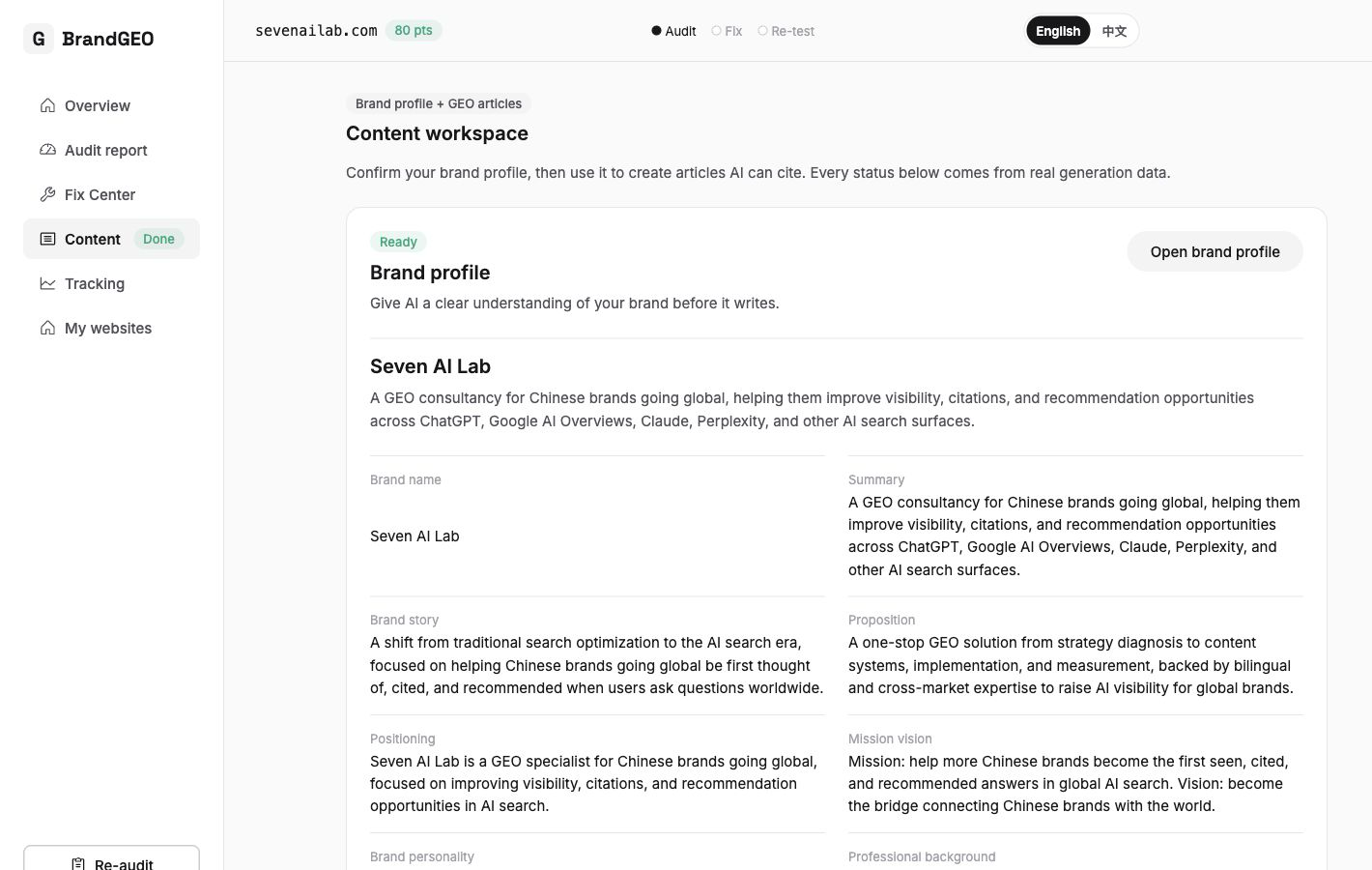 The content workbench provides multiple templates to help you generate GEO-friendly article drafts. Pick one relevant to your business, fill in key information, and the system generates the framework.
By the end of Phase 2, you should see:
- 2–3 new content pieces published, each with structured data and FAQs
- Core page stale content updated
- Another re-audit showing further score improvement (content-level checks will improve)
Phase 3: Days 61–90 · Tracking and Continuous Optimization
The first two phases solved "making AI see you" and "making AI want to cite you." This phase is about "checking if AI has started recommending you" — primarily using the Track dashboard.
Week 9: Establish a Tracking Baseline
Open the Track page's Overview tab. You'll see:
- AI text excerpt cards: How AI engines actually describe your brand (verbatim, not translated or summarized)
- Five summary metrics: Including mention rate, citation count, and other core data
- Dual-line trend chart: Score trend and mention rate trend
This is your tracking baseline. From now on, check the trend chart once a month.
Week 10: Verify with the Probe Library
Go to the Track page's Prompts probe library. This contains a set of test questions relevant to your industry — the questions your potential customers might ask AI. Expand each question to see whether AI's raw response mentions you, which competitors it mentions, and which sources it cites.
If certain high-intent questions (like "which company is best for XX") don't mention you at all, expand to see competitor responses — what did they do right to get cited? The competitor comparison page offers more detailed analysis.
Week 11: Check Citation Sources
Go to the Track page's Citations source library. This shows which specific pages on your site AI cited, and which third-party sources it referenced.
84% of AI citations come from third-party sources rather than brand-owned channels. [8] If you find insufficient third-party coverage, this becomes the direction for your next optimization round — increasing your brand presence on industry directories, review sites, and customer rating platforms.
Week 12: Plan the Next Optimization Round
Return to Actions priority plan and review the long-phase tasks. These are typically brand authority building efforts — work requiring 3–6 months of sustained investment. [2] Also run another re-audit and use the Delta component to compare overall score changes from 90 days ago.
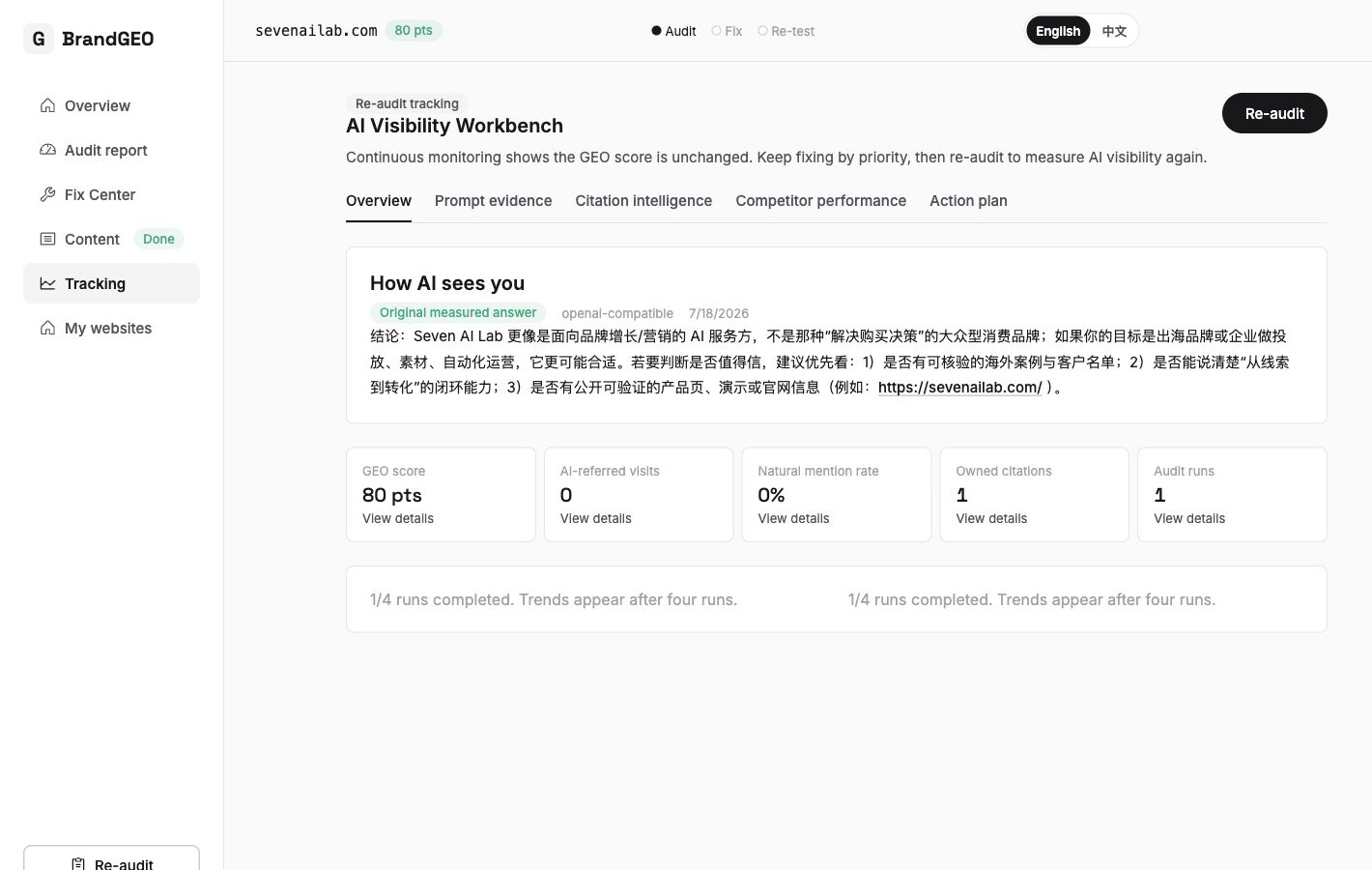 After 90 days, the trend chart should start showing changes. One month of data is a data point; three months of data is a trend. [9]
By the end of Phase 3, you should see:
- Trend chart with at least 3 data points, forming a trend line
- At least some high-intent questions in the probe library starting to mention you
- Quick-phase tasks in the action plan mostly cleared, build-phase mostly complete
What You'll See After Taking Action
Ninety days will not make you an industry leader, but it is enough to complete one baseline → fix → publish → re-test cycle. One practitioner guide cites cases improving within 60–90 days,[10] but 30%–40% is not a justified forecast. Crawl, index, and answer changes have no universal timetable; log technical status weekly and re-test the same prompt set monthly.
More importantly, after 90 days you've established a repeatable workflow:
Monthly cycle:
  Re-audit (check Delta) → Review Track trend chart
    → Read Actions plan, identify next round's priorities
      → Execute → Re-audit
GEO isn't a one-time project but an ongoing practice — like SEO. But unlike SEO, GEO's feedback loop is shorter and signals more direct: your brand either appears in AI's answers or it doesn't. [1]
Some brands discovered after optimization that AI-recommended visits generated $9.41 per visit revenue versus $2.74 from paid channels. [11] Another study documented 3:1 to 8:1 ROI from GEO programs. [12] The prerequisite for these numbers is that you start.
"90 days is enough to establish a baseline, fix key pages, and win the first citations — but GEO's real value is when it becomes an ongoing practice, tracked alongside SEO KPIs." — Superlines GEO Playbook [12]
The three-step progress indicator "Audit → Fix → Re-audit" checks off completely once you've finished a full cycle. But that's not the finish line — it's the starting point for the next cycle.
FAQ
Can one person really do this? No team needed?
Yes. BrandGEO is designed for solo use — every fix task has ready-made code blocks to copy, no developer needed; the content workbench has templates for draft generation, no content team needed; the tracking dashboard monitors automatically, no data analyst needed. GEO is 80% strategy and 20% technical, [2] and the technical part is already automated by the product. The strategy for small teams: focus on 3–5 high-priority pages, use one monitoring tool, and run monthly optimization sprints. [7]
Is 90 days enough, or do I need longer?
90 days is enough to complete the foundation — technical base, content optimization, initial tracking data. But brand authority building (third-party source coverage, industry influence) takes 3–6 months or more. [2] Think of 90 days as the first milestone, not the finish line. One month of data is a data point, three months is a trend, and six months is a defensible program result. [9]
Should I check data every day?
No. Re-audit immediately after technical fixes (deterministic checks, reflected instantly), wait 1–2 weeks after content updates before re-auditing, and check the trend chart once a month for long-term brand building. Checking too frequently shows no meaningful changes and only creates anxiety. AI engines need 4–8 weeks from re-crawling to updating responses. [4] Recommended cadence: re-audit once immediately after technical fixes, then once monthly.
Can I do Phase 1 and Phase 2 simultaneously?
You can, but it's not recommended. Technical fixes are the foundation — if your site is still blocking AI crawlers, even the best content is useless because AI can't read it. Spend 2–3 weeks clearing technical issues first, then move to content optimization. Exception: if your technical checks already all pass (✓), you can skip directly to Phase 2.
Can I just do technical fixes without content optimization?
Technical fixes are necessary but not sufficient. Unblocking crawlers, exposing accessible body text, and adding structured data that matches the page can reduce reading and interpretation barriers. Citation still depends on the query, retrieval corpus, and evidence. The GEO paper observed gains up to about 40% in its fixed benchmark environment,[13] but it does not support assigning 30%–50% of a site's total potential effect to technical fixes.
Does this roadmap work for all types of websites?
The core process (audit → fix → content → track) applies to any website. But specific optimization priorities differ: e-commerce sites focus on product page structured data and review integration; service sites focus on FAQs and case studies; content sites focus on article quality and update frequency. BrandGEO's action plan automatically adjusts priorities based on your site type.
Does GEO conflict with SEO? Will doing GEO hurt my Google rankings?
No conflict — most fixes benefit both. Adding structured data earns rich snippets on Google while helping AI understand content. 97% of Google AI Overview citations come from the top 20 organic results. [14] Doing GEO well actually strengthens your SEO foundation simultaneously. The two investments are additive, not substitutive.
What should I do after 90 days?
Keep cycling. Re-audit once a month to check the Delta, review the trend chart monthly, and revisit the action plan's long-phase tasks quarterly. Shift focus to brand authority building: increase presence on third-party platforms (industry directories, review sites, partner referrals). GEO should operate like financial reporting — measure, benchmark, act, repeat. [3]
Sources
- Writer. "GEO, AEO, and SEO in 2026: The Enterprise Guide to AI Visibility." GEO is not a one-time project but an ongoing cycle. Guide
- Writer. Same source. GEO is 80% strategy, 20% technical; brand authority takes 3–6 months.
- Hikoo. "How to Measure GEO ROI and Impact in 2026." GEO should operate like financial reporting: measure, benchmark, act, repeat. Guide
- SearchScore. "Technical GEO: How to Optimise Your Website for AI Search." 2026. 6.9% of sites unknowingly block AI crawlers; 69.7% lack llms.txt; technical fixes take 4–8 weeks. Guide
- Alhena. "Schema Markup for AI Search: 65% of AI-Cited Pages Use It." 2026. Observations about structured data on cited pages and markup quality; no causal 44% lift from schema plus FAQs. Article
- BotSee. "GEO Is Getting Crowded: A Durable AI Visibility Strategy for 2026." Content updated within 30 days receives 3.2× AI citations. Article
- Superlines. "90-Day GEO Playbook for Small Teams." 2–3 deep articles beat 5 thin ones; small teams focus on 3–5 high-priority pages. Playbook
- Muck Rack. "The State of AI Citations 2026." Across 25 million cited links, an average 84% pointed beyond brands' owned channels. Report
- AirOps. "The Top 7 AI Search Metrics for 2026." One month = data point, three months = trend, six months = defensible result. Article
- Vismore. "Best Ways to Track Brand Mentions in AI Search." 2026. Practitioner guide citing several cases in a 60–90 day window, not a universal growth benchmark. Guide
- HubSpot. "Answer Engine Optimization Case Studies That Prove the ROI of AEO in 2026." AI-referred visits $9.41 vs paid channels $2.74 per visit revenue. Article
- Superlines. "GEO ROI Calculator and Benchmark Data." 3:1 to 8:1 GEO ROI; 90 days enough for baseline and first citations. Tool
- Aggarwal et al. "GEO: Generative Engine Optimization." Princeton/Georgia Tech/IIT Delhi. KDD 2024. In its benchmark generative-search environment, some methods improved visibility metrics by up to about 40%. Paper
- Digital Applied. "What Actually Gets You Cited in AI Search (2026 Data)." 97% AI Overview citations from top 20 organic results. Research
Last updated: 2026-07-22
Ready to start your 90-day GEO roadmap? Open BrandGEO and begin with a free audit. Start your free audit