Before and After: Your AI Visibility Score Really Does Change
TL;DR
A score change is useful only when you can trace it to a measured check. This guide shows how to save a baseline audit, deploy a verifiable website fix, run BrandGEO again, and read the before-and-after Delta. It also separates a deterministic score change from any later change in AI mentions.
TL;DR: GEO optimization isn't guesswork — fix something, then verify it worked. BrandGEO's re-audit loop lets you click "Re-audit" after completing fixes, and the report page's Delta component displays "previous score → new score" with the exact change. This article uses real industry data to show what fixes produce what improvements, how long changes take, and how to use the product to verify your optimization actually worked.
Does GEO Optimization Actually Work? The Data Says Yes
This is the most reasonable skepticism. You spent time adding llms.txt, completing structured data, and refreshing stale content — but will AI search engines actually start recommending you because of these changes?
The answer: yes, with conditions.
In a benchmark system with a fixed retrieval corpus, academic research found that some GEO methods improved statistically significant visibility metrics by up to about 40%; the best method reached as high as 115% for lower-ranked sites.[1] This establishes that presentation can affect exposure in generative search, not that every site will obtain the same lift.
Commercial case studies also report measurable changes: one vendor case showed a 55% increase in its own AI-visibility score, while a separate compilation described conversion differences between AI-referred and organic visitors.[2][4] Their metrics, brands, and windows differ, so they are examples rather than benchmarks. Alhena reports that structured data is common among cited pages, but it does not establish a 44% causal lift from schema plus FAQs.[3]
The defensible conclusion from the original GEO paper is narrower: in the tested generative-search environment, content interventions produced measurable differences in visibility.[1] It did not promise an identical increase for a real brand.
But there's a critical prerequisite: you need to measure. Optimization without a baseline snapshot is target practice with a blindfold.
"Without a measured starting point, no optimization can be proven — the first step is to freeze a snapshot before any action, on a stable list of prompts that matter to your market." — Hikoo GEO ROI Measurement Guide [5]
This is exactly what BrandGEO's re-audit loop solves: it builds the "freeze baseline → fix → re-measure → compare changes" workflow directly into the product.
Check Your Current Score First
Before any optimization, visit the report page to see your current score — this is your baseline.
 The ScoreRing at the top of the report page is your deterministic overall score. Remember this number — you'll return after fixes to see how much it changed.
Beyond the total score, note these key indicators:
- Score Composition: How many points each check contributes. Red bars are deductions — these are your fix priorities.
- Technical Readiness: Expand each item to see what passed (✓) and what failed (×).
- Platform Readiness: Estimated visibility percentages for each AI platform. If measured data is available, it also shows "measured mention rate XX%."
These three sets of data form your baseline — after fixes, you'll observe changes across the same dimensions.
Step by Step: Fix → Re-Audit → See the Delta
Step 1: Execute Fixes According to the Action Plan Priority
Go to the Track dashboard's Actions priority plan to confirm priorities. Start with the quick (win) phase:
- Unblock AI crawlers: If robots.txt blocks GPTBot or ClaudeBot, get the fix code from the Fix center. SearchScore's audit data shows 6.9% of sites unknowingly block at least one major AI crawler. [6]
- Add llms.txt: 69.7% of websites still lack this file; [6] creating one puts you ahead of most competitors. Detailed steps in the llms.txt tutorial.
- Complete structured data: JSON-LD for Organization, Article, and FAQPage schema. 65% of AI-cited pages use structured data. [3] See the schema tutorial for specifics.
If you can't write code, all technical fixes can be copied to an AI coding assistant for one-click execution.
Deploy the fixes to your live website once complete.
Step 2: Return to BrandGEO and Click "Re-Audit"
At the bottom of the Fix center page, you'll see a floating prompt bar: "After completing the steps above, re-audit to see accurate score updates" — with a "Re-audit" button beside it.
Alternatively, find the "Re-audit" button at the bottom of the left navigation sidebar.
 The floating bar at the bottom of the Fix center explicitly tells you: when you're done fixing, it's time to re-audit. Click the button to trigger a fresh audit run.
After clicking, the system re-runs the full audit pipeline — crawling your site, verifying AI crawler access, checking structured data, and re-scoring. This process is identical to your first audit and typically takes 1–2 minutes.
Step 3: View the Delta Comparison on the Report Page
Once the audit completes, you land on the report page. If this isn't your first audit, the report page displays a Delta component — showing:
- Previous score → New score: The total score from your last audit and this audit
- Change amount: How many points it rose or fell, indicated with an arrow and percentage
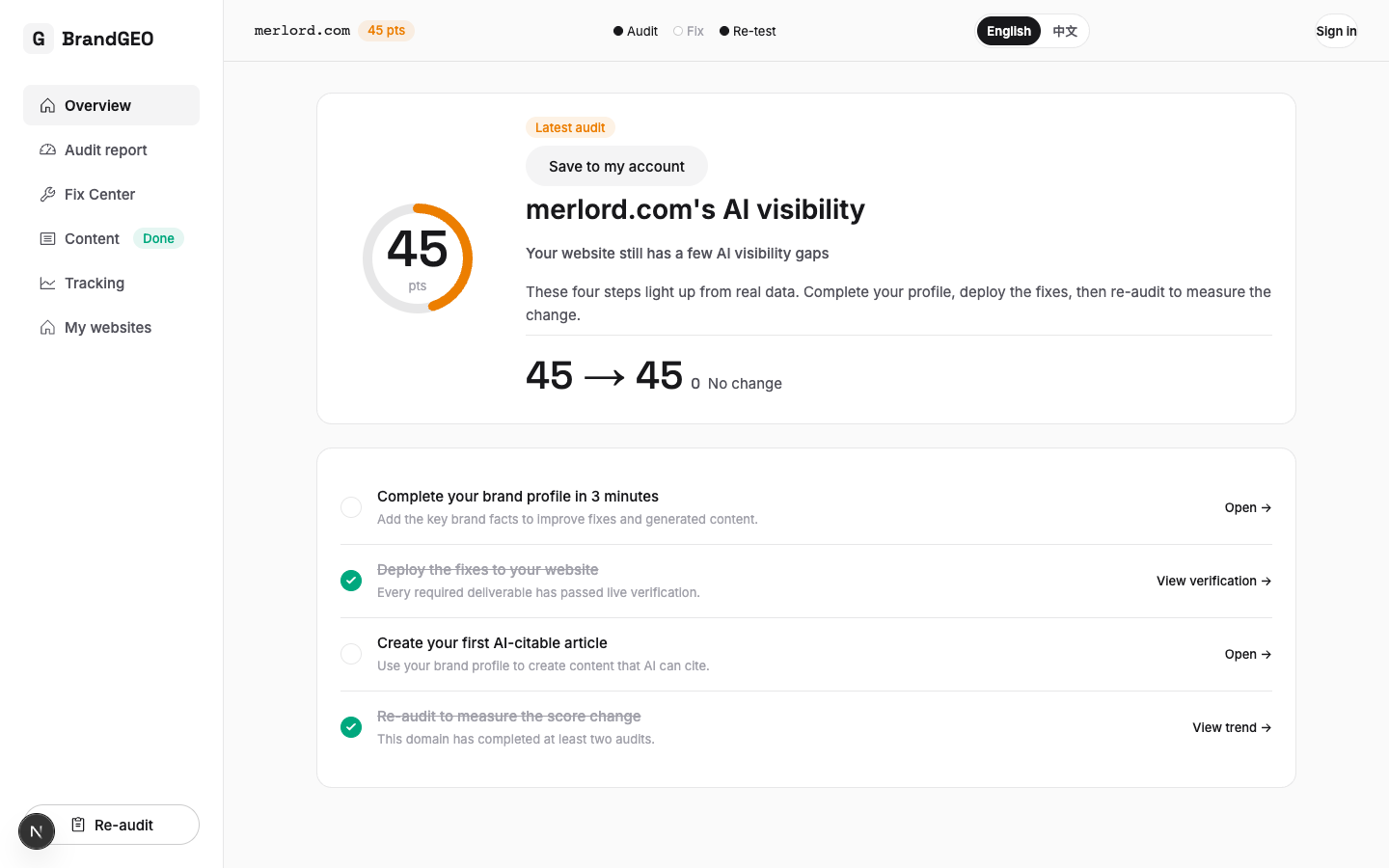 The Delta component answers one question in the most direct way possible: did your fixes work? A green upward arrow means the score improved.
You don't need to manually remember your previous score — the system automatically saves data from each audit.
Step 4: Verify Each Fix Item by Item
Beyond the overall Delta, you can verify each individual fix:
- Technical Readiness area: Have items previously marked × now changed to ✓? For example, if GPTBot was previously blocked (×), it should now show as allowed (✓).
- Score Composition area: Have previous red deduction items turned into green contribution items?
- Platform Readiness area: Have estimated visibility percentages for each platform increased?
If a fix hasn't taken effect — for example, llms.txt was added but Technical Readiness still shows it as missing — it could be that the deployment hasn't propagated, the file path is wrong, or the CDN cached an old version. Return to the Fix center and use the "Verify after deployment" button to check individually.
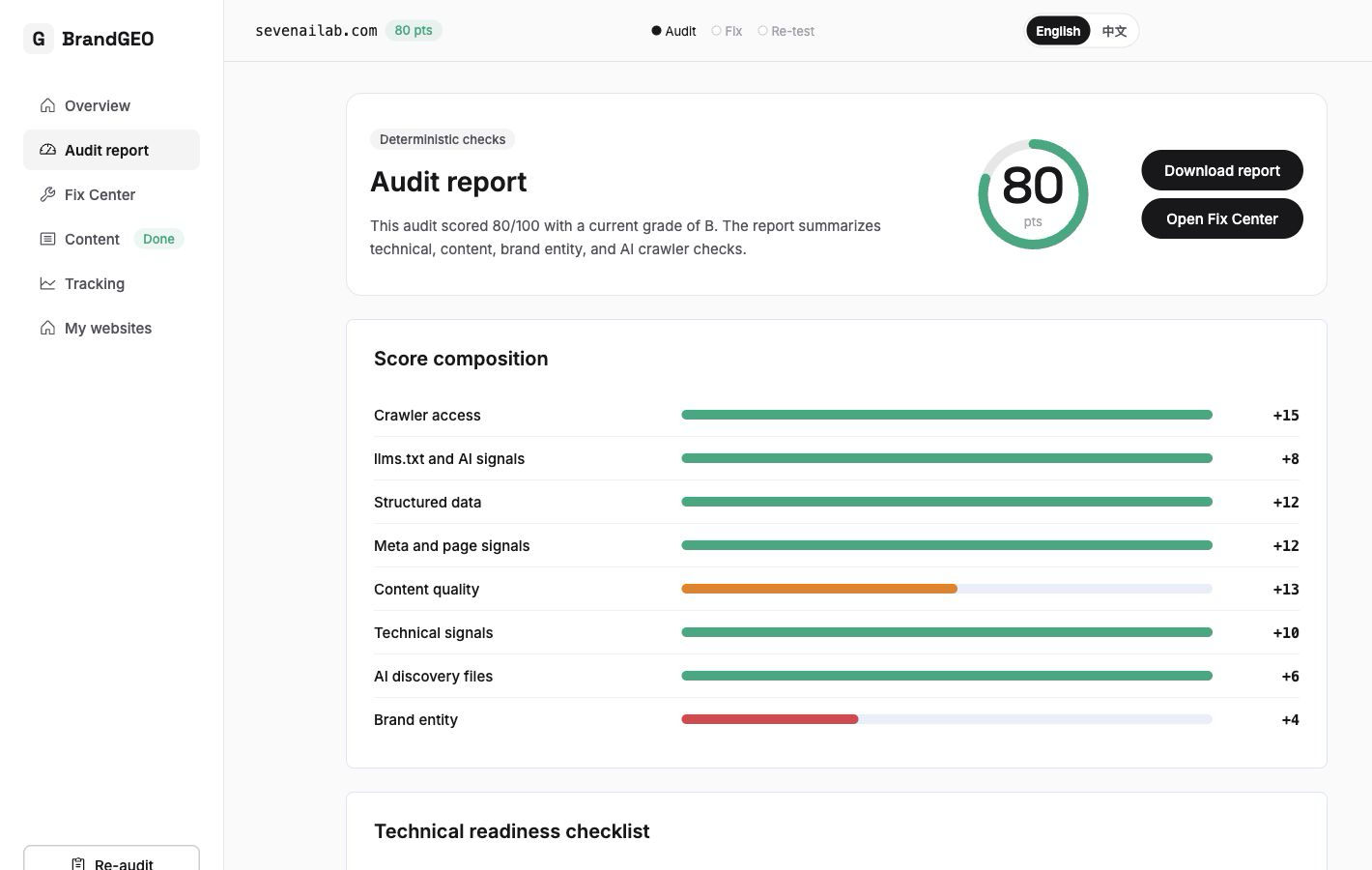 Check item by item: a previous × that's now ✓ means the fix succeeded. Any remaining × marks become the focus of your next fix cycle.
What You'll See After Taking Action
The real experience goes like this: your first round of fixes typically focuses on the technical layer — unblocking crawlers, adding llms.txt, completing structured data. The Delta feedback from these fixes is usually immediately visible in the re-audit (because they are deterministic checks), and you may see the score rise by anywhere from a few points to over a dozen.
But the more important changes take time. AI engines (ChatGPT, Perplexity, Google AI Overviews) have their own crawl and index update cycles:
- Citation effect of technical fixes: Begins reflecting in AI responses after 4–8 weeks. [6]
- Content update effect: Content updated within 30 days receives 3.2× more AI citations than older content. [7]
- Brand authority building effect: 3–6 months before meaningful visibility changes appear. [8]
So what you need isn't a single fix-and-re-audit, but repeating the loop:
Fix → Re-audit (check score Delta)
  → Advance to next round of fixes (per action plan priority)
    → Re-audit again → Check score Delta
      → After 4-8 weeks, check mention rate changes in Track dashboard
This loop is the GEO Closed Loop. BrandGEO's three-step progress indicator — "Audit → Fix → Re-audit" — is the visual representation of this loop. Each completed round updates the progress bar — when all three steps are checked off, you've completed a full optimization cycle.
Do not treat 60–90 days as a guaranteed outcome. One practitioner guide collects cases that improved in that window,[9] while a separate case compilation lists examples involving revenue per AI-referred visit and branded-search changes.[4] Applicability to your site must be tested with a fixed prompt set, consistent definitions, and before-and-after data.
One month of data is a data point, three months is a trend, and six months is a defensible program result. [10] Keep cycling — the data will speak.
FAQ
My score went up after re-auditing, but AI still can't find me — what's going on?
BrandGEO's score is a deterministic readiness score — it measures whether your site is technically and structurally prepared to be cited by AI. A higher score means improved readiness. But between AI engines re-crawling your site and updating their responses, there's a 4–8 week delay. [6] The score changing first is normal — citation effects follow. Monitor mention rate changes in the Track dashboard's Overview and Prompts probe library.
My score actually dropped after re-auditing — what happened?
Several possibilities: your fix introduced a new issue (e.g., accidentally blocking other paths while modifying robots.txt); competitors also optimized, shifting your relative position; or your site content changed in other ways (e.g., a page went offline). Expand Score Composition and Technical Readiness to compare item by item with the previous audit and identify which specific dimension lost points.
How often should I re-audit?
Depends on what you fixed. After technical fixes (unblocking crawlers, adding llms.txt), re-audit immediately — these are deterministic checks and the re-audit will reflect them. After content updates, wait 1–2 weeks before re-auditing — give the audit engine time to crawl your new content. For long-term brand building, once a month is sufficient. Don't re-audit daily — changes too frequent to be meaningful will only create anxiety.
I scored high on my first audit — do I still need to optimize?
A high score means your technical foundation and content structure are solid. But the score only measures "readiness," not "actual performance." High-scoring sites may still have very low actual mention rates in AI search — due to lack of third-party source coverage, insufficient brand authority, or missing content for high-intent queries. Check the Track dashboard for your measured mention rate and competitor comparison — that data tells the real story better than the score alone.
Is the GEO score the same as an SEO score?
No. Traditional SEO measures ranking position on Google search results pages. GEO measures whether you're cited and recommended in AI-generated answers. They overlap — 97% of Google AI Overview citations come from the top 20 organic results [11] — but also diverge. A page can rank first on Google but get skipped by AI because it lacks structured data or isn't "quotable" enough. The GEO score focuses on the latter.
Do my fixes help SEO or just GEO?
Most fixes help both. Adding structured data (JSON-LD) earns rich snippets on Google while helping AI understand your content. Completing robots.txt to allow all crawlers benefits both Google and AI. Refreshing stale content improves freshness for both channels. The only purely GEO fix is llms.txt — it currently targets AI engines specifically. So your time investment yields dual returns.
Can the Delta component show historical trends?
The Delta component shows "this audit vs. last audit" comparison. For longer-term trends, visit the Track dashboard's Overview page — it features a dual-line trend chart (score trend + mention rate trend) showing score progression across multiple audits. You need at least 3 audits to see a meaningful trend line.
What should I do after completing technical fixes?
Technical fixes are the first step, but only the first step. Next, progress through build-phase content optimizations per the action plan priority: update stale content, write new content AI will want to cite, and fill in missing FAQs. Then comes the long-phase brand authority building — increasing your presence on third-party platforms. The complete 90-day roadmap is in this guide.
Sources
- Aggarwal et al. "GEO: Generative Engine Optimization." Princeton/Georgia Tech/IIT Delhi. KDD 2024. In its benchmark generative-search environment, some methods improved visibility metrics by up to about 40%; lower-ranked sites reached as high as 115%. Paper
- HelpfulHero. "How Schema Markup Boosts AI Visibility by 55% (Case Study)." 2026. Structured data optimization achieving 55% score increase. Case Study
- Alhena. "Schema Markup for AI Search: 65% of AI-Cited Pages Use It." 2026. Observations about structured data on cited pages and markup quality; no causal 44% lift from schema plus FAQs. Article
- HubSpot. "Answer Engine Optimization Case Studies That Prove the ROI of AEO in 2026." AI-referred visitor conversion 4.4×; $9.41 vs $2.74 per visit revenue; branded search +156%. Article
- Hikoo. "How to Measure GEO ROI and Impact in 2026." Baseline snapshot as prerequisite for measuring optimization effect. Guide
- SearchScore. "Technical GEO: How to Optimise Your Website for AI Search." 2026. 6.9% of sites unknowingly block AI crawlers; 69.7% lack llms.txt; technical fixes take 4–8 weeks. Guide
- BotSee. "GEO Is Getting Crowded: A Durable AI Visibility Strategy for 2026." Content updated within 30 days receives 3.2× AI citations. Article
- Writer. "GEO, AEO, and SEO in 2026: The Enterprise Guide to AI Visibility." 3–6 month visibility score change timeline. Guide
- Vismore. "Best Ways to Track Brand Mentions in AI Search." 2026. Practitioner guide citing several cases in a 60–90 day window, not a universal growth benchmark. Guide
- AirOps. "The Top 7 AI Search Metrics for 2026." One month = data point, three months = trend, six months = defensible result. Article
- Digital Applied. "What Actually Gets You Cited in AI Search (2026 Data)." 97% AI Overview citations from top 20 organic results. Research
Last updated: 2026-07-22
Want to see the before-and-after score change for yourself? Open BrandGEO for a free audit, then click "Re-audit" after fixing to compare the Delta. Start your free audit